

Why Your Business Isn't Showing Up on Google (and What to Fix First)
Table Of Contents
Quick answer. Why isn't my business showing up on Google? For most service businesses the answer is one of four things. Google can't find or read your website. Your Google Business Profile is missing or not verified. Your business details don't match across the web. Or your site never says what you do and where you do it. Fix them in that order. The first two fixes are free, and you can get both started in an afternoon.
You search for your own business and nothing comes up. Or worse, your competitor down the street shows up three times and you're nowhere. If you've ever typed "why isn't my business showing up on Google" into the search bar at eleven at night, you're not alone. It's one of the most common questions I hear from coaches, contractors and wellness pros.
Here's the good news. It's almost never because Google has something against you. It's usually one or two boring, fixable things. And because they're boring, most business owners never get around to checking them.
Picture a pool contractor who's convinced he needs to spend a few thousand dollars on SEO to rank higher on Google. Twenty minutes of looking around shows his website is set to hide itself from search engines. One checkbox, ticked since the day the site was built. This happens far more often than you'd think, and it means a business can be invisible for years without knowing it.
So before you hire anyone or buy anything, let's walk through what's actually going on and what to fix first.
Why Isn't My Business Showing Up on Google? The Usual Suspects
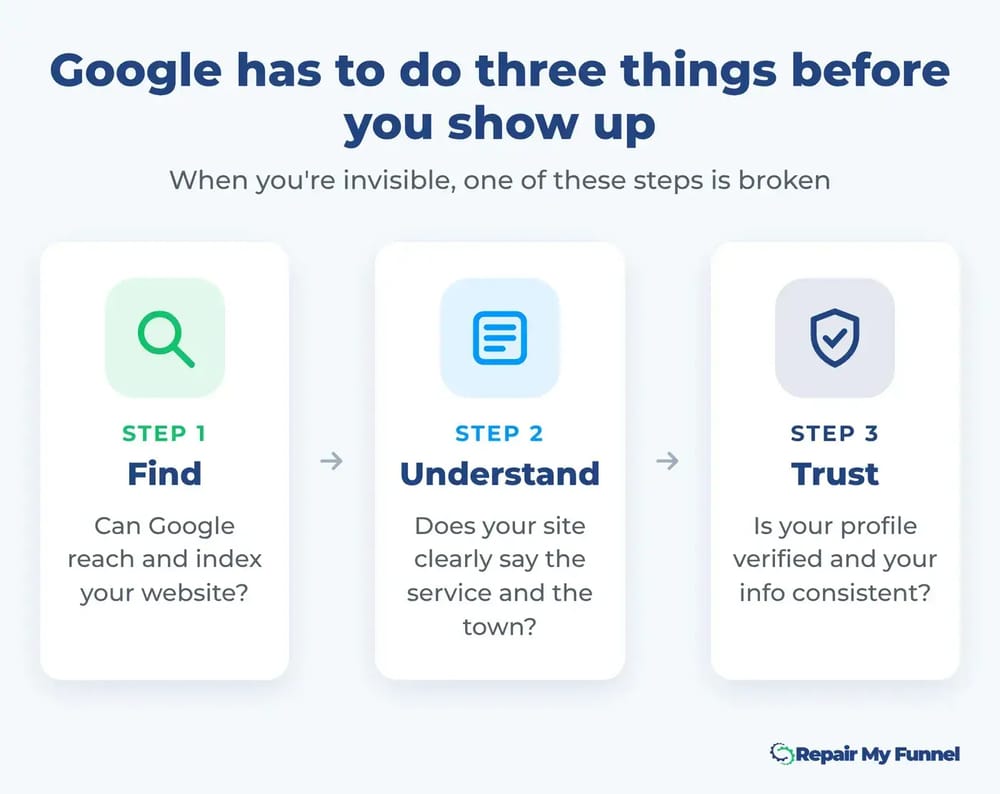
Google has to do three things before you show up. It has to find your website, understand what you do, and trust that you're a real business in a real place. When you're invisible, one of those three steps is broken.
Here are the problems I see most often with service businesses, roughly from most common to least.
- The website is brand new and Google simply hasn't found it yet
- The site is set to hide from search engines, often left over from when it was being built
- There's no Google Business Profile, or it was started and never verified
- Your name, address and phone number are different on your site, your profile and your directory listings
- The homepage talks about passion and quality but never says the service or the town
- You're searching a broad phrase like plumber and expecting to beat companies that have been around for twenty years
That last one matters more than people think. Showing up for your own business name is step one. Showing up when someone searches "plumber near me" is a longer game. Let's fix the first one before we chase the second.
Fix One. Make Sure Google Can Actually See Your Site
Start here because nothing else matters if Google can't get in the door.
The quickest test is to search Google for your exact web address, like yourbusiness.com, and see whether your own pages come up. If nothing from your site shows up, Google probably hasn't indexed it yet. That just means Google hasn't added your pages to its search results.
If that's you, check these in order.
- Look in your website builder's settings for anything called search engine visibility, hide from search or noindex, and make sure it's turned off
- Set up Google Search Console, Google's free tool for site owners, and prove that you own the domain
- Submit your sitemap inside Search Console so Google has a map of every page
- Use the URL inspection tool on your homepage and request indexing
Every major website builder has a way to do this, and you won't need to touch any code. Once your site is submitted, give it a few days to a few weeks. Brand new domains can take a little longer, and that's normal.
Fix Two. Claim and Finish Your Google Business Profile
For a local service business, your Google Business Profile is often more important than your website. It's the box with your reviews, hours and a Call button that shows up on the map. When someone searches roof repair in your town, the map results usually sit above the regular website results.
A profile that's half filled out gives Google very little to work with. Google itself says to make your profile as complete as possible.
- Verify the profile so it's actually live, not stuck in pending
- Pick the most specific primary category you can, like massage therapist instead of health
- List your service areas if you go to the customer instead of having them come to you
- Add your real services with a short description of each
- Upload actual photos of your work, your team and your vehicles
- Keep your hours current, especially around holidays
Say a wellness coach has a profile under her personal name with a category of consultant. She switches the category to life coach, adds her three services and uploads a handful of photos. Now Google has a much clearer picture of who she is and who she serves. That kind of cleanup is often the difference between invisible and on the map.
Fix Three. Make Your Business Details Match Everywhere
Google compares your details across the web. Maybe your website lists Suite 200 and your profile says Ste 2. Meanwhile an old directory still shows the address you moved out of in 2021. Now Google isn't sure which one is right.
This is called NAP consistency, short for name, address and phone. It sounds fussy, but it's one of the easiest ways to remove doubt for Google and for customers.
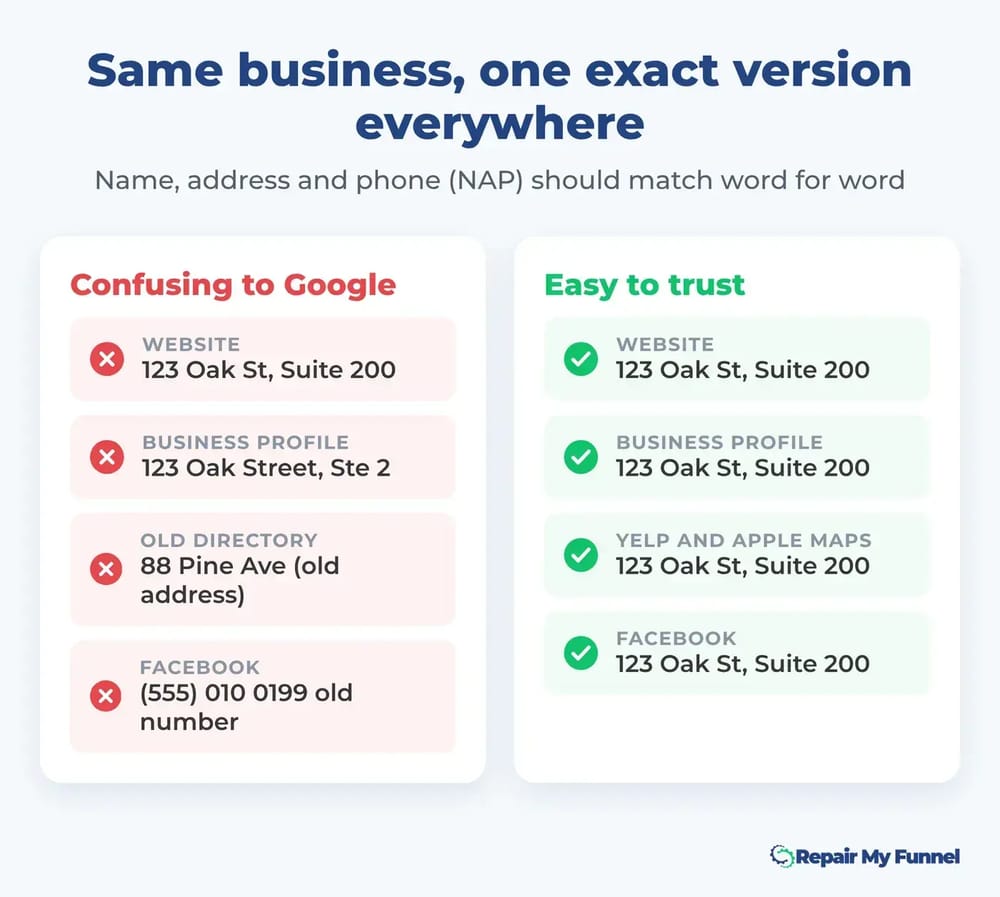
Pick one exact version of your business name, address and phone number. Write it down. Then make sure that exact version shows up everywhere you're listed. That means your website footer, your Google Business Profile, Facebook, Yelp, Bing Places, Apple Maps and any industry directories.
If you've changed phone numbers, moved or rebranded, this is probably part of your problem. Clean up the old listings instead of just creating new ones.
Fix Four. Tell Google What You Do and Where You Do It
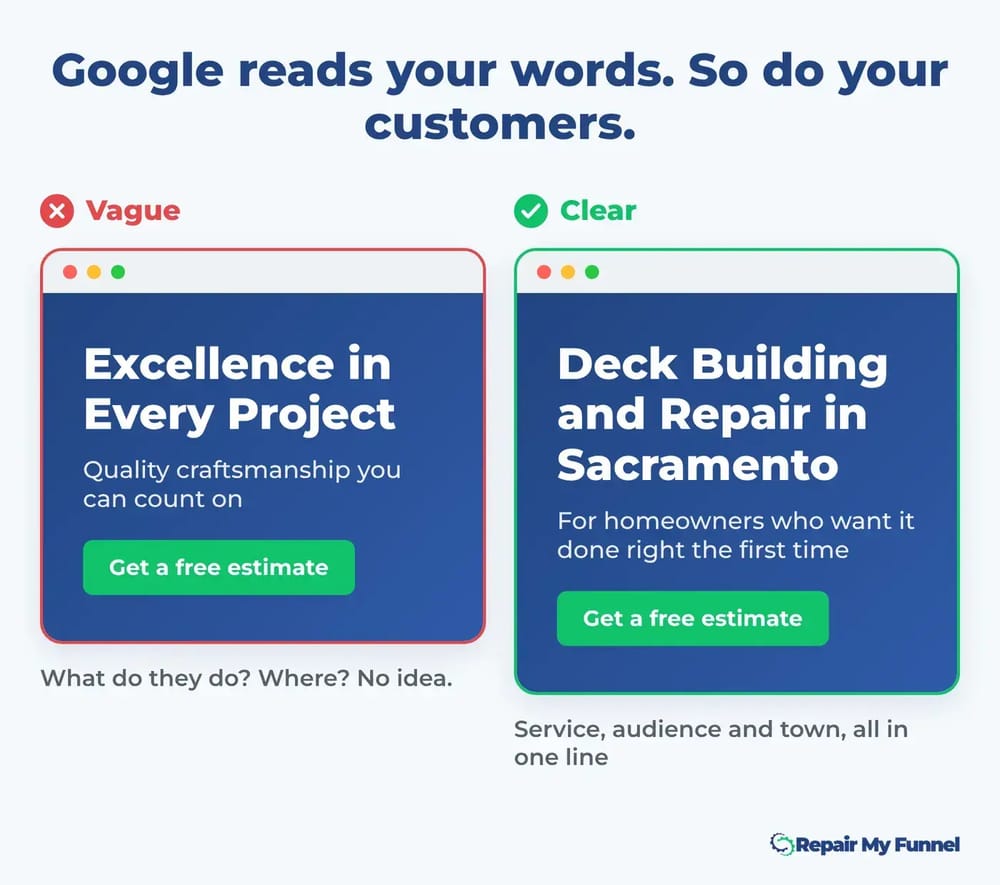
This is the one people skip because it feels too obvious. But Google reads your words. If your homepage headline says "Excellence in Every Project," Google has no idea you're a deck builder in Sacramento.
Your homepage should clearly say three things in plain language. What you do, who you do it for, and where. Something like "Deck Building and Repair for Homeowners in Sacramento" tells a person and a search engine exactly what they need to know.
- Put your main service and city in the page title and the main headline
- Give each core service its own page instead of cramming them all into one list
- Mention the towns you serve in a natural way on your pages
- Include your address or service area in the footer of every page
If you want to go deeper on this side of things, my Local SEO 101 guide for small businesses walks through the full picture.
Be Patient With the Right Things
Once the four fixes are in place, showing up for your business name usually happens fast. Showing up for broader searches takes longer. That part comes down to reviews, helpful content and time.
That's fine. The goal right now is to stop being invisible. Think of someone who hears about you from a friend and searches your name. They should find you right away, with your reviews and phone number right there.
And once you're showing up, make sure the page they land on actually gets them to call. Being found is only half the job. If people are visiting but not reaching out, read why your homepage isn't getting calls next.
Keep Reading
Ready for the next step? These pick up right where this post leaves off.
- Local SEO 101 for small businesses
- Why your homepage isn't getting calls
- Customer journey mapping for service businesses
- Free tool. QR code generator to send people from your truck, cards and flyers straight to your Google reviews
Want More Fixes Like This Every Week?
Every Monday I send the Spark & Scale newsletter with one practical fix you can make to get found, get more calls and spend less time fighting your tech. It's free and quick to read, and it's written for service business owners, not marketers.
Join Spark & Scale (Free) →
Frequently Asked Questions
How long does it take for a new business to show up on Google?
For your exact business name, it often takes a few days to a few weeks. The clock starts once your site is indexed and your Google Business Profile is verified. For broader searches like your service plus your city, expect a few months of steady work on reviews, content and consistent listings.
Do I need a website to show up on Google?
Not strictly. A verified Google Business Profile can show up on the map without one. But a website gives Google more to understand and gives customers somewhere to go. The two work far better together than either one alone.
Why does my business show up on Google Maps but not in regular search?
Maps results come mostly from your Google Business Profile, while regular results come from your website. If you show up on one but not the other, the weak side needs attention. Usually that means the website isn't indexed or doesn't clearly name your service and location.

Howdy, I'm Tyson
Owner Of Repair My Funnel
Growing your service business online shouldn't feel overwhelming or confusing. That's exactly why I created Repair My Funnel.
I've spent years mastering ClickFunnels and digital marketing systems, but more importantly, I've learned how to translate that expertise into simple, clear guidance for business owners who just want their online presence to work. My mission is helping established service businesses build professional websites, effective funnels, and reliable systems that attract and convert more clients without the tech stress.
Here on the blog, you'll discover practical strategies from our proven 5-pillar framework covering everything from building a solid website foundation to creating content that drives organic traffic. Whether you're a coach, contractor, wellness professional, or local service provider, you'll find step-by-step guides and real-world tactics designed specifically for service businesses like yours.
Ready to get actionable insights delivered weekly? Join the Spark & Scale Newsletter where I share my best strategies to help you attract more clients, streamline your systems, and grow your business with confidence.
Featured Articles

Learn how to efficiently navigate your ClickFunnels 2.0 courses using the new search feature! This quick tutorial shows you how to search for specific lessons and content within your course, making it easier than ever to find what you need.

Learn how to test your free courses in ClickFunnels 2.0 with our detailed, step-by-step guide. Ensure a seamless experience for your students by enrolling as a test contact, exploring course content, and resolving any potential issues before your course goes live. Perfect for ClickFunnels 2.0 users looking to optimize their course offerings.

Learn how to automate your marketing efforts by triggering workflows from broadcast emails in ClickFunnels 2.0. This step-by-step guide covers everything you need to know, from setting up triggers based on email activity to practical applications that boost engagement and streamline your funnel processes.

Learn how to convert your videos into high-quality GIFs using EZGif with our comprehensive step-by-step guide. Discover tips on optimizing GIF size, adjusting frame rates, and enhancing your content for faster load times and better user engagement.

Latest Posts
Tuesday, October 01, 2024
Monday, September 30, 2024
Monday, September 30, 2024
RepairMyFunnel.com, a DT Designs LLC Product ■ All Rights Reserved © 2024-2025 ■ 1212 5th Ave N, Apt 2, Seattle, WA 98109
Privacy Policy - Terms - Disclaimer - Contact