

Master Email Templates in ClickFunnels 2.0: Step-by-Step Creation and Usage Guide
Hey there! If you’re anything like me, you probably send out a lot of emails—newsletters, promotions, updates, you name it. But let’s be honest, starting from scratch every time can get old fast. That’s where email templates come in! With ClickFunnels 2.0, you can create reusable templates that save you time and keep your branding consistent. In this guide, I’m going to show you how to create an email template and, more importantly, how to use it like a pro. Ready to dive in? Let’s go!
Accessing the Email Templates Section
Navigating to Workspace Settings

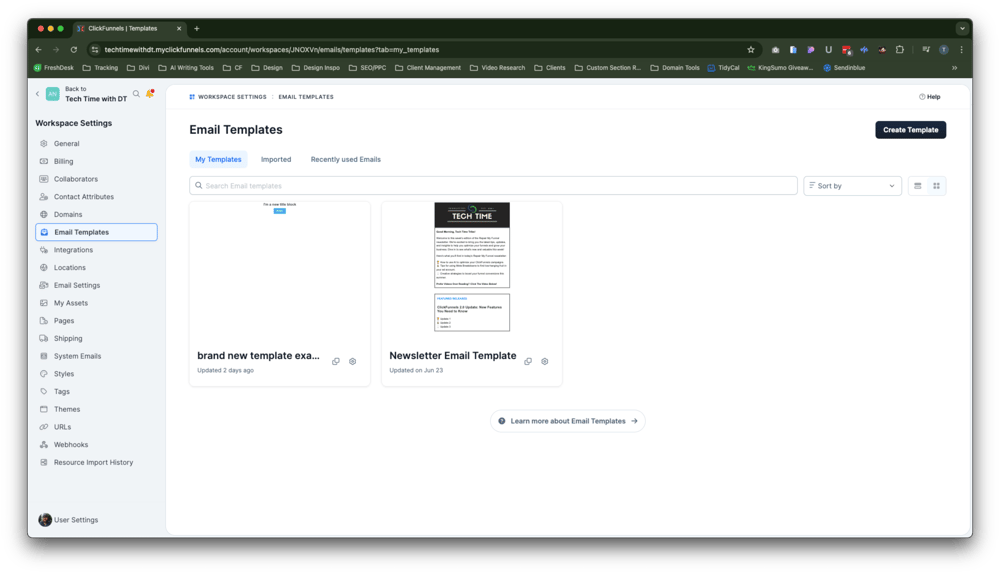
First things first—let’s find where the magic happens. To access the Email Templates section in ClickFunnels 2.0, you’ll need to head over to your Workspace Settings. Don’t worry, it’s super easy to find:
- Go to Workspace Settings: Look at the bottom left-hand side of your screen, and click on “Workspace Settings.” It’s right there, hanging out with all your other important tools.
- Find the Email Templates Section: Once you’re in the Workspace Settings, you’ll see a new left-hand navigation menu. Scroll down until you spot “Email Templates” between “Domain” and “Integrations.” Click on it, and you’re in!
Exploring the Email Templates Overview
Welcome to the Email Templates section! Here’s where you can see all the email templates you’ve created, imported, or even used in other emails. It’s like your personal email design library. Whether you’ve crafted a beautiful newsletter or just need a starting point for a new campaign, you’ll find everything neatly organized right here.
You’ll notice there are different tabs for different types of templates—My Templates, and Imported Templates. If you’ve ever created an email in a workflow or a broadcast, you can save that layout as a template and access it here anytime you want.
Creating an Email Template
Starting the Template Creation Process
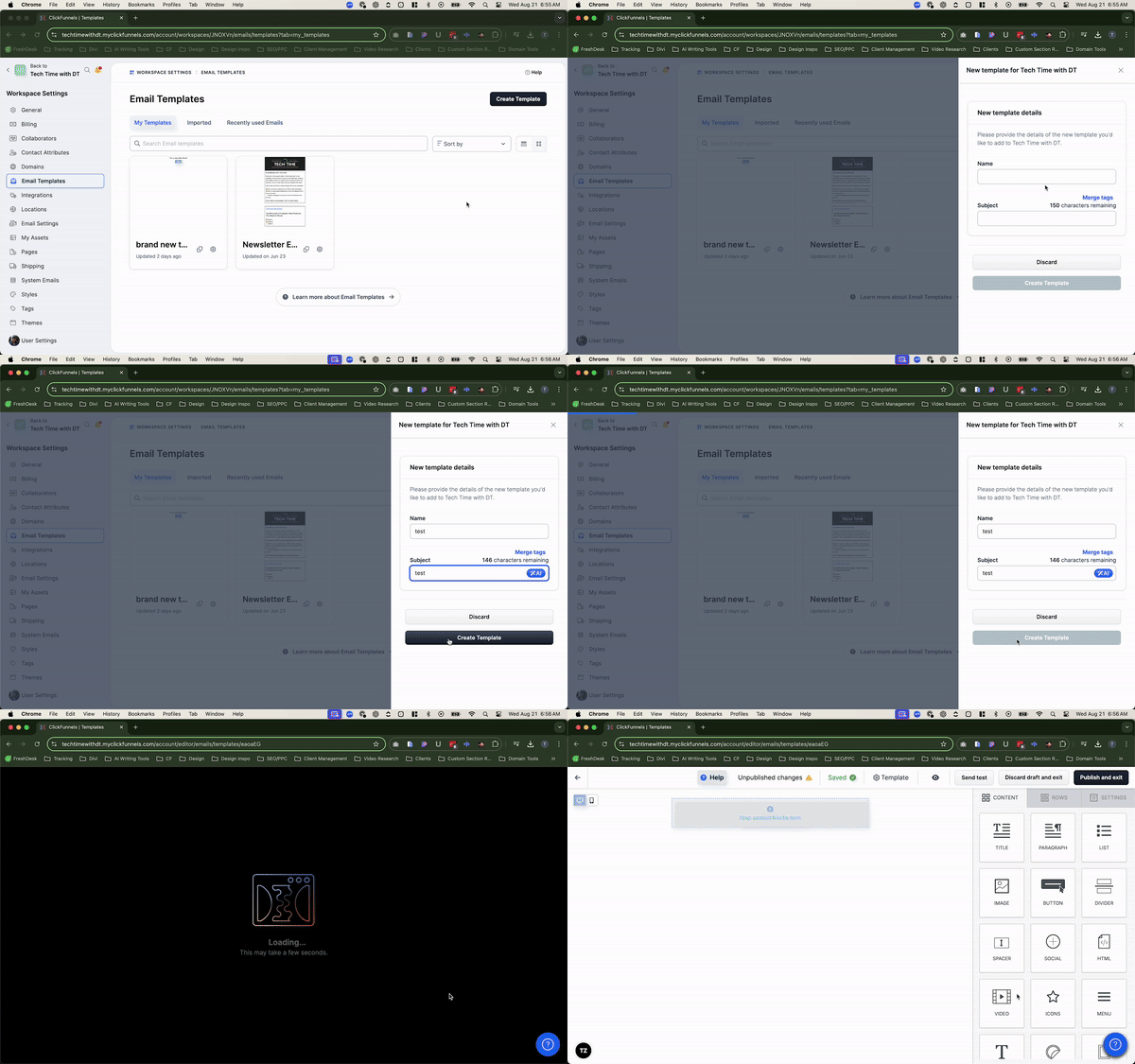
Alright, let’s get to the fun part—actually creating your email template. Here’s how you can start:
- Click on “Create Template”: On the right-hand side of the Email Templates page, you’ll see a big button that says “Create Template.” Go ahead and click it.
- Name Your Template: A pop-up will appear asking you to name your template and set a subject line. Let’s keep it simple—name it something that’s easy to remember, like “Newsletter Template” or “Promo Blast Layout.” For the subject line, you can use something generic for now, like “This is just a test.”
- Use Merge Tags for Personalization: Want to get fancy? You can use merge tags in your subject line to personalize it with the recipient’s name, email, or other details. It’s like adding sprinkles to your email sundae—it makes everything a little sweeter!
Once you’ve got everything set up, click “Create Template,” and you’ll be taken straight to the email editor where the real magic happens.
Designing Your Template
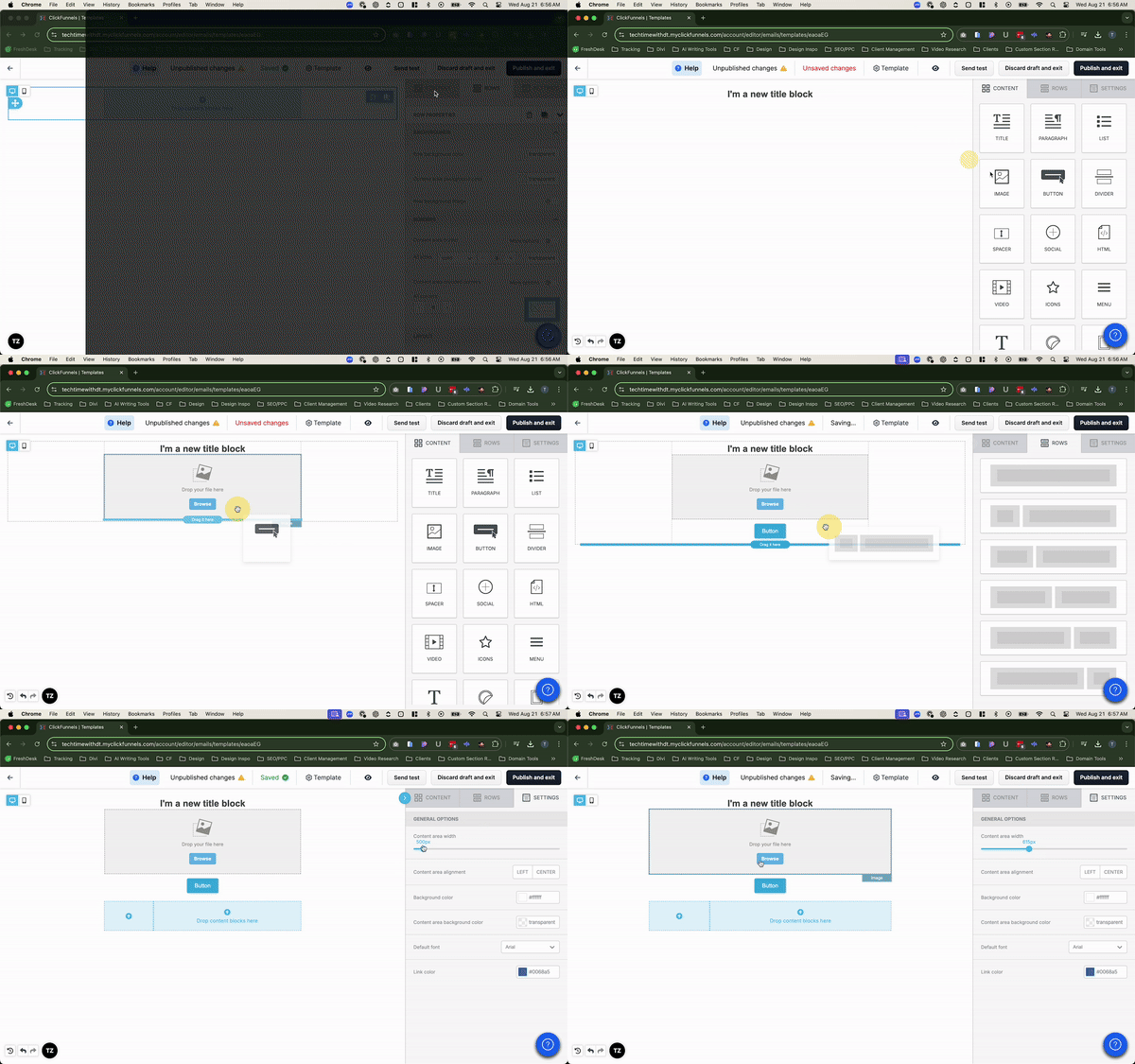
Now that you’re in the email editor, it’s time to let your creativity run wild. Designing your email template is all about making sure it looks great and functions well, without having to start from scratch each time.
- Add Content Elements: On the right-hand side, you’ll see a bunch of content elements like text blocks, images, buttons, and more. Drag and drop these elements into your email template to start building your layout. Want to add a headline? Drag in a text block. Need a call-to-action button? Grab a button element and drop it where you want it. It’s like building with digital LEGO blocks—no mess, just fun!
- Customize Your Elements: Once you’ve got your content in place, it’s time to tweak things. Click on any element, and you’ll see options to customize it. For example, you can change the font size of your headline, adjust the color of your buttons, or add padding to make sure everything looks just right. If you want to move something around, click on the move icon (it looks like little arrows) and drag the element to its new spot. Easy peasy!
- Add Rows for Structure: If you want to organize your content into sections, use rows. Click on the “Rows” tab, and you’ll see various layout options like single-column, two-column, or even six-column rows. Drag the layout you like onto your template, and then fill it with content elements. Rows help keep things neat and organized, which is especially helpful if you’re adding multiple sections to your email.
- Adjust Overall Settings: Over in the “Settings” tab, you can customize the overall look of your email. You can change the background color, adjust the width of your content area, and even set the default font for your text. Pro tip: Keep your content width around 600-650 pixels to ensure your email looks great on both desktop and mobile devices. And don’t be afraid to play around with the settings—you can always undo changes if something doesn’t look right.
Remember, this is your template, so make it look and feel like your brand. Whether you want something sleek and minimalistic or bold and colorful, the power is in your hands!
Saving and Managing Your Template
Publishing Your Template
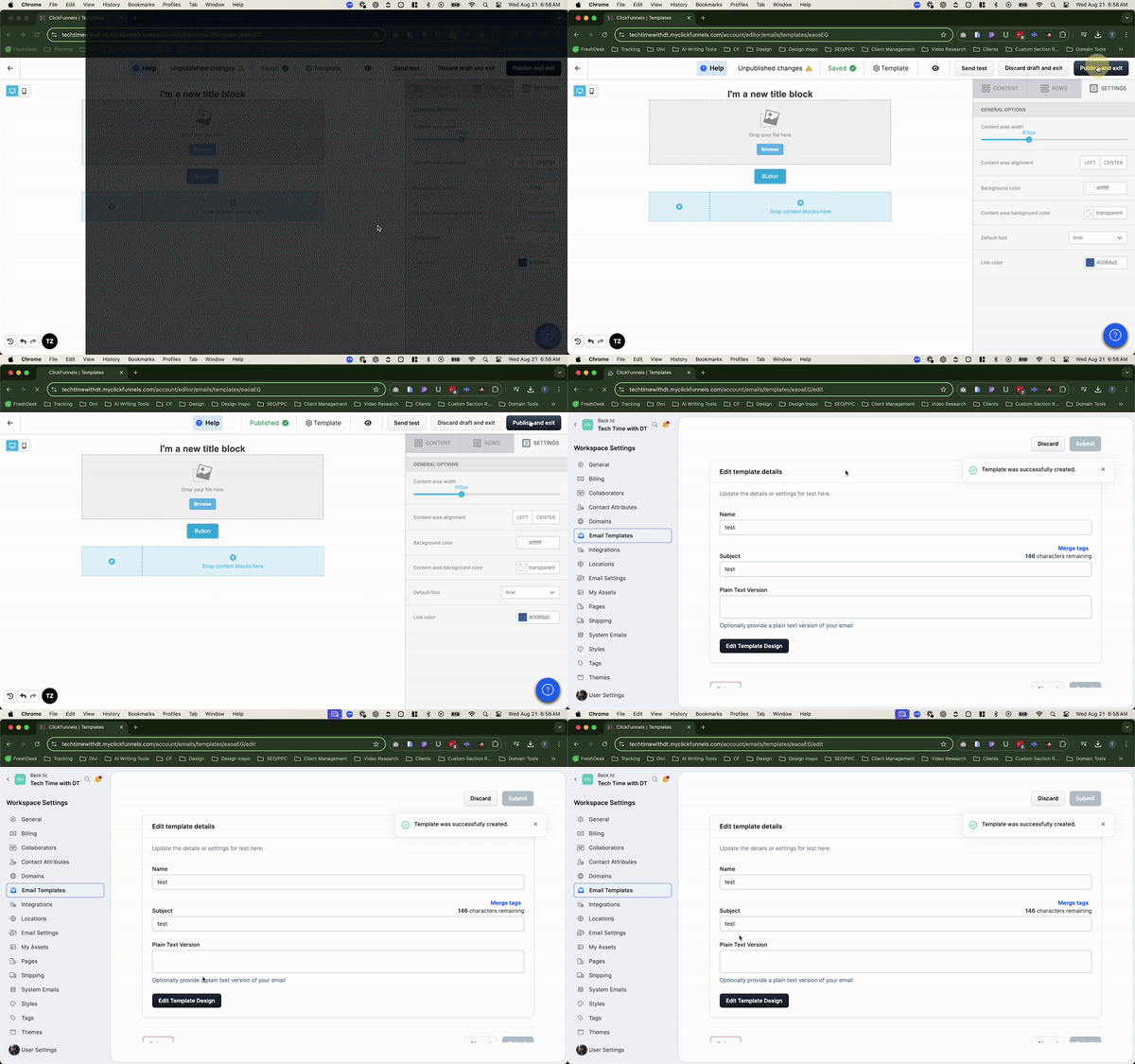
Once you’re happy with your design, it’s time to save your masterpiece:
- Click “Publish & Exit”: Over on the right-hand side of the screen, you’ll see a button that says “Publish & Exit.” Click that, and your template is saved and ready to go!
- View Your Template: After saving, you’ll be taken back to the Email Templates overview page, where you’ll see your new template listed. From here, you can manage your template—edit the name, tweak the subject line, or even jump back into the editor to make changes.
Using Your Template in Emails
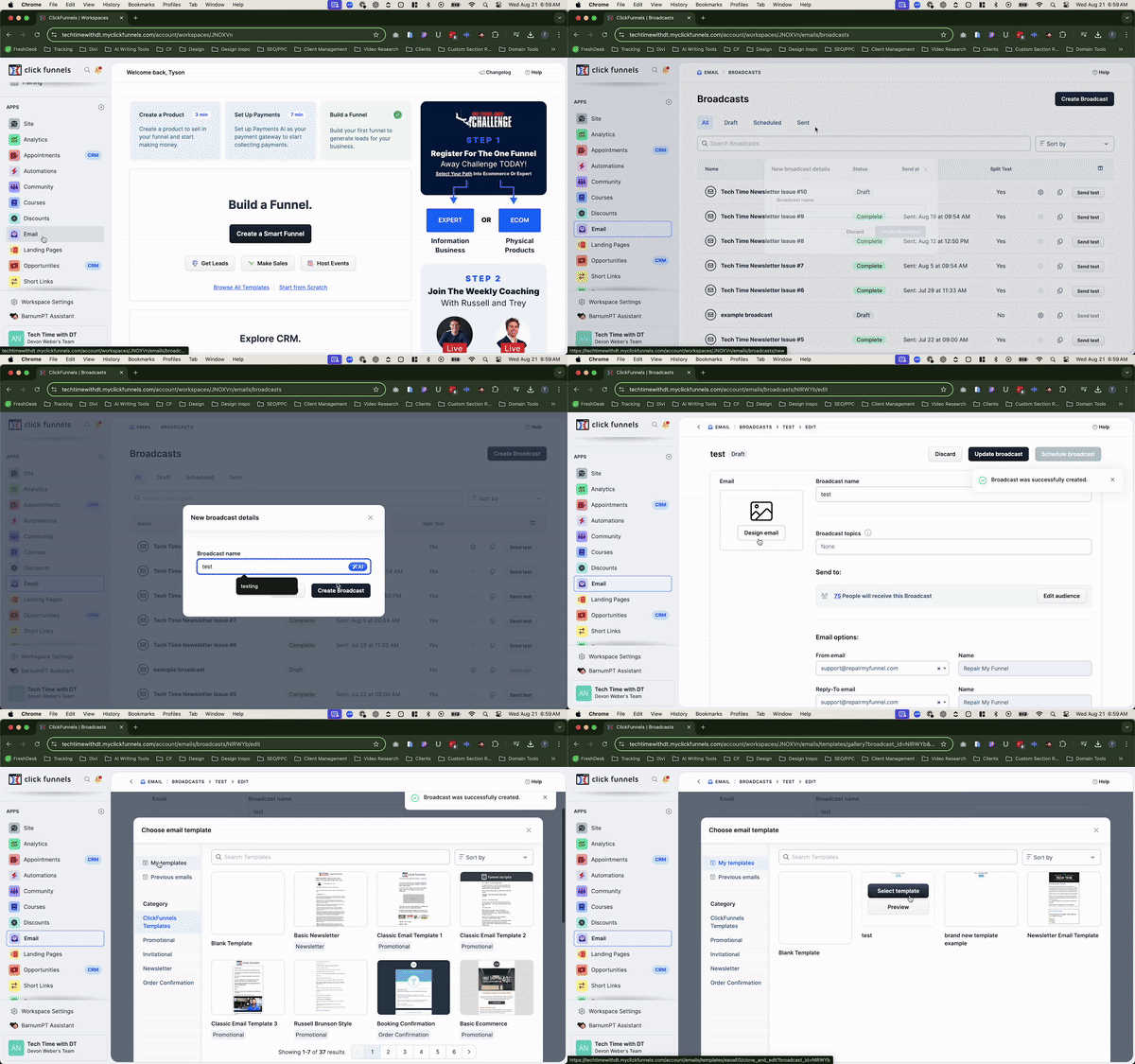
Now that you’ve got your shiny new template, it’s time to put it to work! Whether you’re sending a one-off broadcast or setting up an email in a workflow, using your template is a breeze:
- Create a Broadcast: Let’s say you want to send out a quick announcement to your subscribers. Head over to the “Broadcasts” section and click on “Create Broadcast.”
- Design Your Email: On the next page, you’ll see an option to “Design Email.” Click on that, and in the top left corner, you’ll see “My Templates.” Click on it, and all your saved templates will appear.
- Select Your Template: Find the template you just created, click on it, and boom—you’re ready to start crafting your message! The layout is already in place, so all you need to do is add your content and hit send.
The same process applies when you’re setting up an email in a workflow. Just add an email step, click to design the email, and select your template from “My Templates.” Easy, right?
Best Practices for Email Templates
Now that you’re a template pro, here are a few tips to make sure you’re getting the most out of your email designs:
- Keep It Fresh: While templates save you time, don’t fall into the trap of using the same design over and over without any tweaks. Update your template every so often to keep things looking fresh and engaging.
- Test for Mobile: Always preview your template on both desktop and mobile devices. A design that looks amazing on your computer might not translate perfectly to a smartphone screen, so make sure it’s optimized for both.
- Personalize When Possible: Use merge tags to add a personal touch to your emails. Including the recipient’s name or other personalized details can make a big difference in engagement.
- Organize Your Templates: If you’re creating multiple templates, keep them organized with clear names and categories. This makes it easier to find the right template when you need it.
Troubleshooting Email Templates
Even the best-laid plans can sometimes hit a snag. But don’t worry, if you run into issues with your email templates in ClickFunnels 2.0, we’ve got you covered. Here are some common problems and how to fix them:
- Formatting Looks Off:
• The Problem: You’ve spent time crafting your email template, but when you preview it, the formatting looks off—maybe text is misaligned, or images aren’t displaying correctly.
• The Fix: Double-check your content elements and rows. Sometimes, dragging and dropping elements can cause small alignment issues. Make sure each element is placed correctly, and use the settings to fine-tune margins and padding. If something still seems off, try adjusting the content area width to ensure everything fits nicely on both desktop and mobile screens. - Missing Elements in the Final Email:
• The Problem: You’ve included all your essential content, but when the email is sent, some elements are missing.
• The Fix: Ensure that each element is properly saved before you exit the editor. If you’re using conditional visibility (like showing different content to different segments), double-check those settings to make sure everything is set up correctly. Also, preview the email in multiple email clients to ensure consistent rendering. - Images Not Displaying Properly:
• The Problem: Your images look great in the editor, but when the email is sent, they don’t display correctly, or worse, they don’t show up at all.
• The Fix: Make sure your images are properly uploaded and linked. Check the image URL to ensure it’s pointing to the correct location. Also, keep image sizes in check—large files can cause loading issues. Use an image optimizer to reduce file size without sacrificing quality, and always include alt text for images in case they don’t load for some recipients. - Template Not Responsive on Mobile:
• The Problem: Your email looks perfect on desktop, but when viewed on a mobile device, the layout is all over the place.
• The Fix: Go back to the settings and adjust the content width (around 600-650 pixels is usually ideal). Also, consider using single-column layouts for mobile versions of your email to ensure everything stacks neatly. Always preview your emails on mobile before sending them out. - Template Not Showing in My Templates:
• The Problem: You’ve created and saved a template, but when you try to use it, it’s not showing up under “My Templates.”
• The Fix: First, make sure you actually saved and published the template. If it’s still not showing up, try refreshing your browser or logging out and back in to ClickFunnels. If the problem persists, it could be a bug—reach out to ClickFunnels support for assistance.
When to Seek Help
If you’ve tried everything and your email template is still acting up, don’t sweat it—you’ve got backup. At Repair My Funnel, we specialize in providing expert support for ClickFunnels users. While we might not be able to fix software bugs directly, we’re pretty good at finding workarounds and getting things running smoothly again.
For persistent issues that seem to be software-related, we can help guide you on the best steps to take and even assist you in reaching out to ClickFunnels support if needed. In most cases, we’ll work with you to find a solution that keeps your email campaigns on track while the underlying issues are being resolved.
So, before you get too frustrated, reach out to us. We’ll help you troubleshoot and find the best path forward.
Final Thoughts
And there you have it! With email templates in ClickFunnels 2.0, you’ve got a powerful tool to streamline your email marketing efforts. Whether you’re sending out newsletters, promotions, or updates, templates save you time and keep your branding consistent. Plus, with a little customization, you can make sure every email reflects your unique style.
Remember, creating a template is just the beginning. Keep experimenting, refining, and updating your designs to stay fresh and engaging. And if you ever run into any hiccups, you know who to call—Repair My Funnel is here to help you keep things running smoothly.
So go ahead, dive into your email campaigns with confidence. With your new templates in hand, you’re all set to wow your audience, save time, and make the most of your ClickFunnels 2.0 experience.
If you have any lingering questions or need further assistance, feel free to reach out for support. And don’t forget to subscribe to our Tech Time newsletter for more tips, tricks, and guides sent directly to your inbox every Monday.
Additional Resources
For further assistance and more in-depth guides, check out these resources:
If you need personalized help, contact our support team at support@repairmyfunnel.com.
Additional FAQs
Can I use my email templates across different funnels and workflows?
Absolutely! Once you’ve created an email template, you can use it in any funnel, workflow, or broadcast email within ClickFunnels 2.0. Just select your template from the “My Templates” section when designing your email.
How can I make sure my email template looks good on mobile devices?
To ensure your template is mobile-friendly, keep the content width between 600-650 pixels and use single-column layouts for sections that might appear cramped on smaller screens. Always preview your email on both desktop and mobile before sending it out.
What should I do if my images aren’t displaying correctly in my email?
Double-check that your images are properly uploaded and linked. Reduce the file size using an image optimizer to prevent loading issues, and always include alt text for images in case they don’t load for some recipients.
Can I edit an email template after it’s been used in a broadcast?
Yes, you can! If you need to make changes to a template, simply go back to the Email Templates section, select the template, and click “Edit Design.” Keep in mind that changes to the template won’t affect emails that have already been sent.
What if I can’t find a solution to an issue with my template?
If you’re stuck, don’t hesitate to reach out to us at Repair My Funnel. We can help troubleshoot most issues and provide workarounds if necessary. For software-related bugs, we’ll assist you in reaching out to ClickFunnels support to get things resolved.

Howdy, I'm Tyson
Owner Of Repair My Funnel
Growing your service business online shouldn't feel overwhelming or confusing. That's exactly why I created Repair My Funnel.
I've spent years mastering ClickFunnels and digital marketing systems, but more importantly, I've learned how to translate that expertise into simple, clear guidance for business owners who just want their online presence to work. My mission is helping established service businesses build professional websites, effective funnels, and reliable systems that attract and convert more clients without the tech stress.
Here on the blog, you'll discover practical strategies from our proven 5-pillar framework covering everything from building a solid website foundation to creating content that drives organic traffic. Whether you're a coach, contractor, wellness professional, or local service provider, you'll find step-by-step guides and real-world tactics designed specifically for service businesses like yours.
Ready to get actionable insights delivered weekly? Join the Spark & Scale Newsletter where I share my best strategies to help you attract more clients, streamline your systems, and grow your business with confidence.
Featured Articles
Stuck building your whole website at once? Launch a 3-page minimum viable funnel first (homepage, offer, action), start getting leads, then add the rest.

Stop guessing if your site works. Track three simple numbers (traffic, conversion rate, cost per result) to diagnose exactly what to fix and what to leave alone.

Got the right content but no conversions? Learn the 4 beliefs to build, in order, so your landing page turns hesitation into yes without writing anything new.
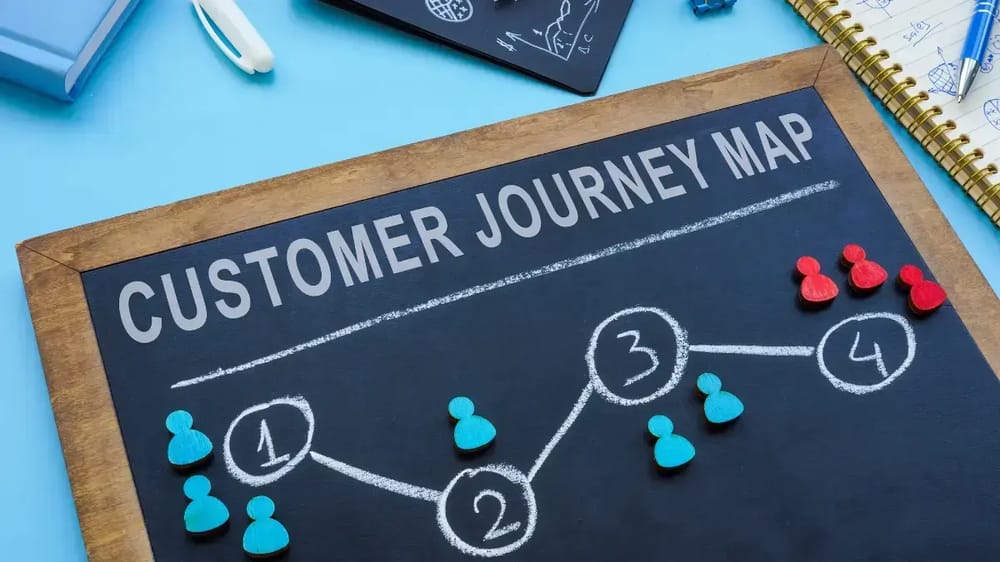
Getting traffic but not clients? Learn how to map your customer journey in four simple steps and find the exact gap where service businesses lose the most leads.

Latest Posts
Monday, June 29, 2026
RepairMyFunnel.com, a DT Designs LLC Product ■ All Rights Reserved © 2024-2025 ■ 1212 5th Ave N, Apt 2, Seattle, WA 98109
Privacy Policy - Terms - Disclaimer - Contact