

Mastering the ClickFunnels 2.0 Editor: A Comprehensive Overview

Hey there! Tyson from Repair My Funnel here, and today I’m giving you a detailed overview of the ClickFunnels 2.0 editor. This guide will help you understand the main features and functionalities so you can navigate the editor with ease and confidence.
Key Features of the Editor
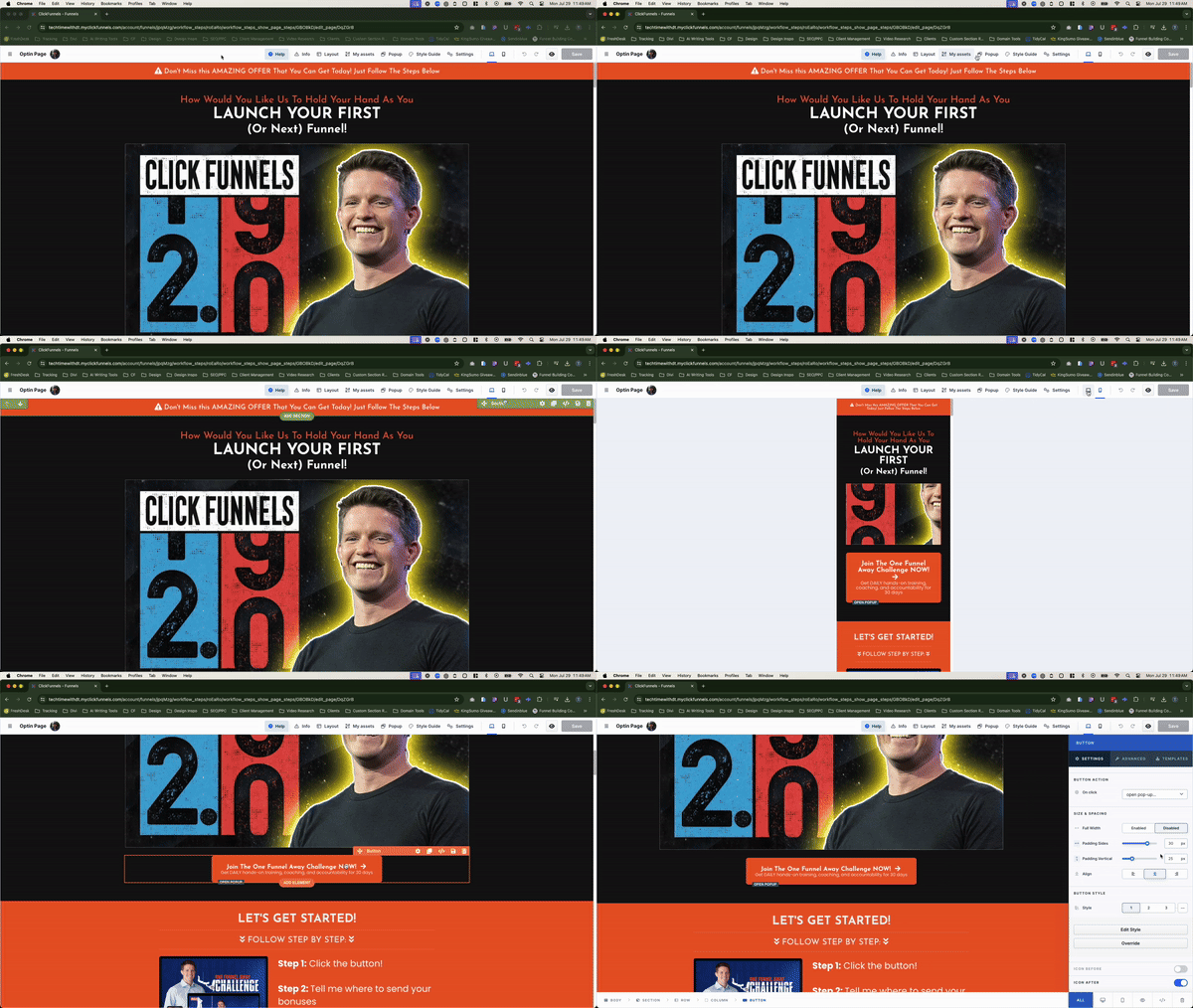
First things first, to get your blog up and running, you need to enable the Site app in your workspace. This step is crucial as it unlocks the blogging functionality within ClickFunnels 2.0. Here’s how to do it:
- Top Navigation:
•Help: Access support articles and contact support quickly. It’s your first stop if you run into issues or need guidance.
•Info: Debug your page to identify and resolve issues efficiently. This feature highlights errors or warnings, providing solutions to common problems like multiple checkout blocks on a single page.
• Layout: Manage your page’s structure, including sections, rows, and elements. You can drag and drop elements to reorganize your layout easily.
• My Assets: This section includes pre-made templates and your saved templates. Drag and drop headers, footers, and other elements onto your page to speed up the design process. You can also search and organize these assets for quick access.
• Popup: Create and edit popups to engage visitors or capture leads. Show or hide popups and customize their settings directly in the editor.
• Style Guide: Quickly adjust fonts, colors, and other style elements to maintain brand consistency. This feature provides a shortcut to making global style changes across your funnel. - Editor Settings:
• Page Background: Set a default background for your entire page or choose specific backgrounds for sections and rows.
• Topography: Adjust the fonts used on your page, including size, weight, and family. This ensures your text elements are consistent with your brand.
• Custom Code: Add custom CSS or tracking codes for advanced customization and analytics. This is useful for adding unique styles or integrating third-party tools.
• Device View: Toggle between desktop and mobile views to ensure your page looks great on all devices. This helps you create a responsive design that adapts to different screen sizes.
• Undo/Redo: Easily revert changes or redo them to experiment with different design options. This feature provides a safety net for your editing process. - Editing Elements:
• Hierarchy: Understand the structure—sections (green), rows (blue), and elements (orange). This hierarchy helps you manage complex page designs effectively.
• Element Settings: Access settings for individual elements like text, buttons, and images. Adjust padding, style, colors, and advanced options like animations and logic.
• Quick Edit Bar: Make quick changes to text elements directly on the page without opening the settings panel.
• Add Elements: Easily add new sections, rows, or elements to your page. This feature includes a wide variety of elements to enhance your design, from simple text and images to complex forms and countdown timers. - Additional Features:
• Breadcrumbs: Navigate between different layers of your page using the breadcrumbs at the bottom left. This feature speeds up your workflow by allowing quick access to parent elements.
• Save and Preview: Save your changes frequently and use the preview option to see your page in real-time. This ensures your design looks and functions as expected before publishing.
Tips for Using the Editor
- Universal Sections: Save sections as universal to apply changes across multiple pages automatically—perfect for headers, footers, and other common elements. This feature saves time and ensures consistency across your site.
- Rename Sections, Rows and Elements: To make it easier to find things throughout your page, creating new names for the different pieces of the page (especially sections and rows) will help keep things organized in the long run.
Final Thoughts
The ClickFunnels 2.0 editor is a powerful tool designed to enhance your funnel-building process. Keep experimenting with its features, and don’t hesitate to reach out if you have any questions at support@repairmyfunnel.com. Don’t forget to subscribe to our Tech Time newsletter for more tips and updates delivered every Monday!

Howdy, I'm Tyson
Owner Of Repair My Funnel
Growing your service business online shouldn't feel overwhelming or confusing. That's exactly why I created Repair My Funnel.
I've spent years mastering ClickFunnels and digital marketing systems, but more importantly, I've learned how to translate that expertise into simple, clear guidance for business owners who just want their online presence to work. My mission is helping established service businesses build professional websites, effective funnels, and reliable systems that attract and convert more clients without the tech stress.
Here on the blog, you'll discover practical strategies from our proven 5-pillar framework covering everything from building a solid website foundation to creating content that drives organic traffic. Whether you're a coach, contractor, wellness professional, or local service provider, you'll find step-by-step guides and real-world tactics designed specifically for service businesses like yours.
Ready to get actionable insights delivered weekly? Join the Spark & Scale Newsletter where I share my best strategies to help you attract more clients, streamline your systems, and grow your business with confidence.
Featured Articles
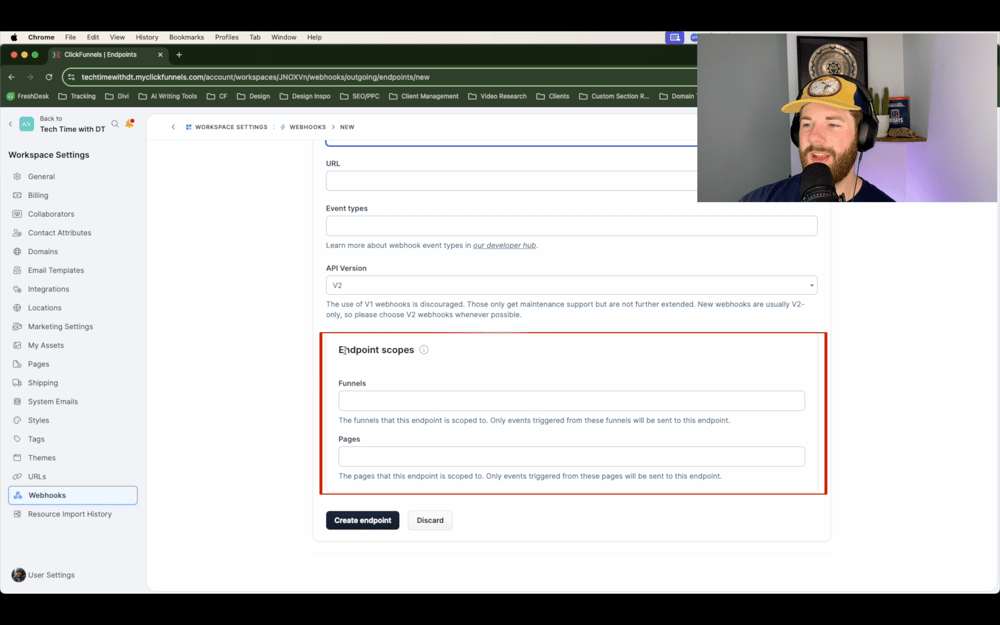
Learn how to optimize your ClickFunnels 2.0 automation by specifying webhook endpoints for specific funnels and pages. Our step-by-step guide ensures precise data transfer and efficient workflow management.

Learn how to customize event invites in ClickFunnels 2.0 using merge tags for personalized and branded communication. Follow our guide to enhance your event marketing.

Discover the new survey funnels feature in ClickFunnels 2.0. Learn how to set up, customize, and integrate surveys into your funnels with our step-by-step guide.
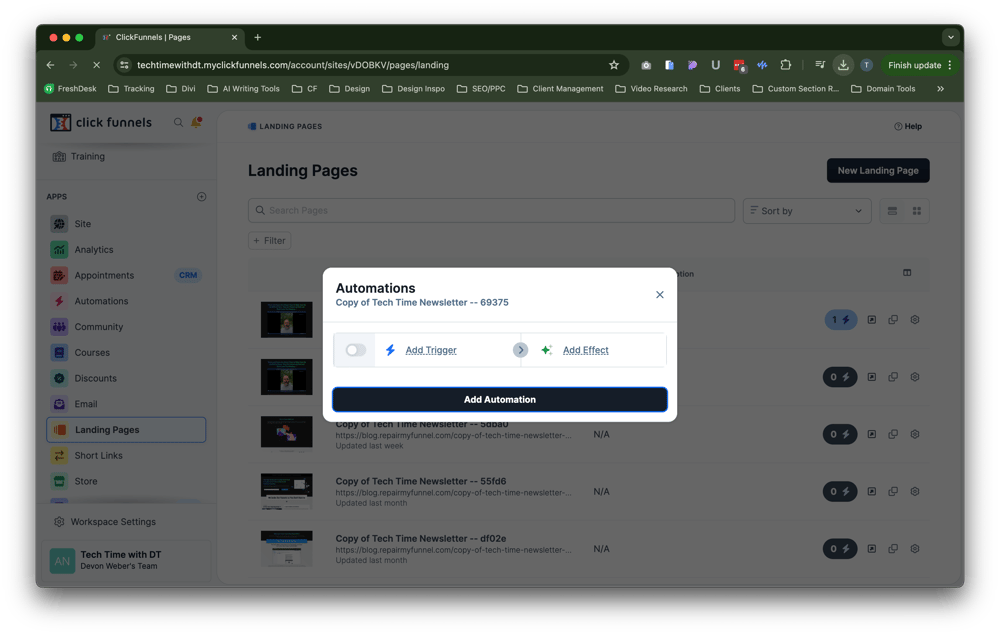
Learn how to set up one-step automations in ClickFunnels 2.0 with our step-by-step guide. Simplify your tasks and improve efficiency today.

Latest Posts
Monday, September 16, 2024
Monday, September 16, 2024
How to Trigger Workflows Based on Workflow Email Actions in ClickFunnels 2.0 | Step-by-Step Tutorial
Monday, September 16, 2024
RepairMyFunnel.com, a DT Designs LLC Product ■ All Rights Reserved © 2024-2025 ■ 1212 5th Ave N, Apt 2, Seattle, WA 98109
Privacy Policy - Terms - Disclaimer - Contact